

Contact
Kathmandu,Nepal
9745652548 / 49

Table of Contents
In today’s hyper-connected world, people value efficient communication more than anything else, and for a trust-driven business world, your email address says more about your brand than you might think. Whether you’re reaching out to customers, vendors, or partners, using professional business email can instantly signal trust, professionalism, and credibility, which is very valuable.
A branded email address, like [email protected], sends a clear signal that you’re a serious, established, and trustworthy business. It reinforces your brand identity with every message you send and helps build confidence among potential clients who may be encountering your business for the first time. Apart from trust and credibility, professional business emails come with security, deliverability, and collaboration features, making them essential not just for image, but for performance and conversion. In short, if you want your business to be taken seriously, a professional business email isn’t optional; it’s foundational.
More importantly, branded emails often come with enhanced security, deliverability, and collaboration features, making them essential not just for image, but for performance. In short: if you want your business to be taken seriously, a professional business email isn’t optional, it’s foundational.
What Is a Branded Business Email?
A branded business email is an email address that uses your company’s domain name, like [email protected], instead of a generic service provided by Gmail, Yahoo, or Outlook. It ties your brand’s online identity to your domain name, giving your communication a professional touch.
For example, a business website www.yohocloud.com can have a branded email like [email protected] or [email protected]. This not only reinforces your brand in every inbox but also builds trust by assuring recipients that the message is coming from a legitimate source. When compared with traditional emails we are used to, like, you [email protected] seems informal, temporary, or even untrustworthy, especially when used for professional communications.
Top Benefits of Using a Professional Business Email Address
If you’re still using a generic email like [email protected] or [email protected], it’s now time to think seriously about your communication strategy. Upgrading to a professional business email, one that uses your company’s domain name, is one of the simplest actions you can take to boost your brand’s credibility, visibility, and communication efficiency.
Here’s how using a business email address with your own domain gives your company a real edge:
Builds Trust and Credibility with Customers
When you communicate with your client through a generic email address like [email protected], it instantly signals that it’s a normal email they get every day. With a branded professional business email? the same email is now looked with legitimacy and a sense of trust. People are naturally cautious about online communication as the trend for spam, and scams are rising. A custom business email address shows you’re running a serious, established operation that can be trust with time, information, and money.
Especially in industries like finance, tech, and eCommerce, using a branded domain email adds a layer of professionalism that reassures potential clients. In short: a trustworthy email domain helps you win trust faster and stand out from less credible competitors.
Strengthens Your Brand Identity Across All Channels
A branded email address doesn’t just help with communication, it’s a branding tool. Every time you communicate through your email, you’re reinforcing your business name. This consistent exposure builds recognition and strengthens brand recall over time.
Think about it: all of your business assets, your website, business cards, invoices, marketing emails, and social media all point to your brand. Shouldn’t your email address do the same? A professional business email address keeps your brand experience consistent across every asset, which is essential for a strong foundation and long term growth.
Improves Email Deliverability and Inbox Placement
Deliverability is one of the most overlooked benefits of setting up a business email correctly. With so much spam messages and scam happening each day, free email provide providers like Gmail and Yahoo often get flagged as spam when used in bulk or cold outreach. But when you send emails and communicate from your own verified domain, with properly configured DNS records like SPF, DKIM, DMARC, and proper content, your business emails are 99% likely to land in users inbox.
This is critical for things like customer support, invoicing, appointment confirmations, and marketing campaigns. Missed emails = missed opportunities. A reliable business email setup protects your sender reputation and increases the odds that your messages are seen and acted upon.
Projects Professionalism from the First Contact
First impressions are everything, especially in digital communication. Whether you’re reaching out to a new lead, following up on a proposal, or networking with industry peers, your email address is the first thing they see. Using a custom domain like [email protected] immediately sets a professional tone and signals that you’re organized, established, and serious about your business.
Even small businesses and solo entrepreneurs benefit from this perception boost, a professional business email address shows that you’ve invested in your brand and take client relationships seriously.
How to Set Up a Professional Business Email (Step-by-Step):
1. Buy a Domain Name for Your Business
Before you can create a branded business email, you’ll need to own a custom domain name (like yourcompany.com). If you already have a website, you may already own one, if not, you can register a domain at a very reasonable price with Yoho.Cloud and experience instant activation.
Tip: Choose a domain that matches your business name and is easy to spell and remember. This will make your email address look more professional (e.g., [email protected]).
2. Choose a Business Email Hosting Provider
Once you have your domain, you’ll need a provider that can host your email accounts. Here are a few excellent options, all available via Yoho.Cloud:
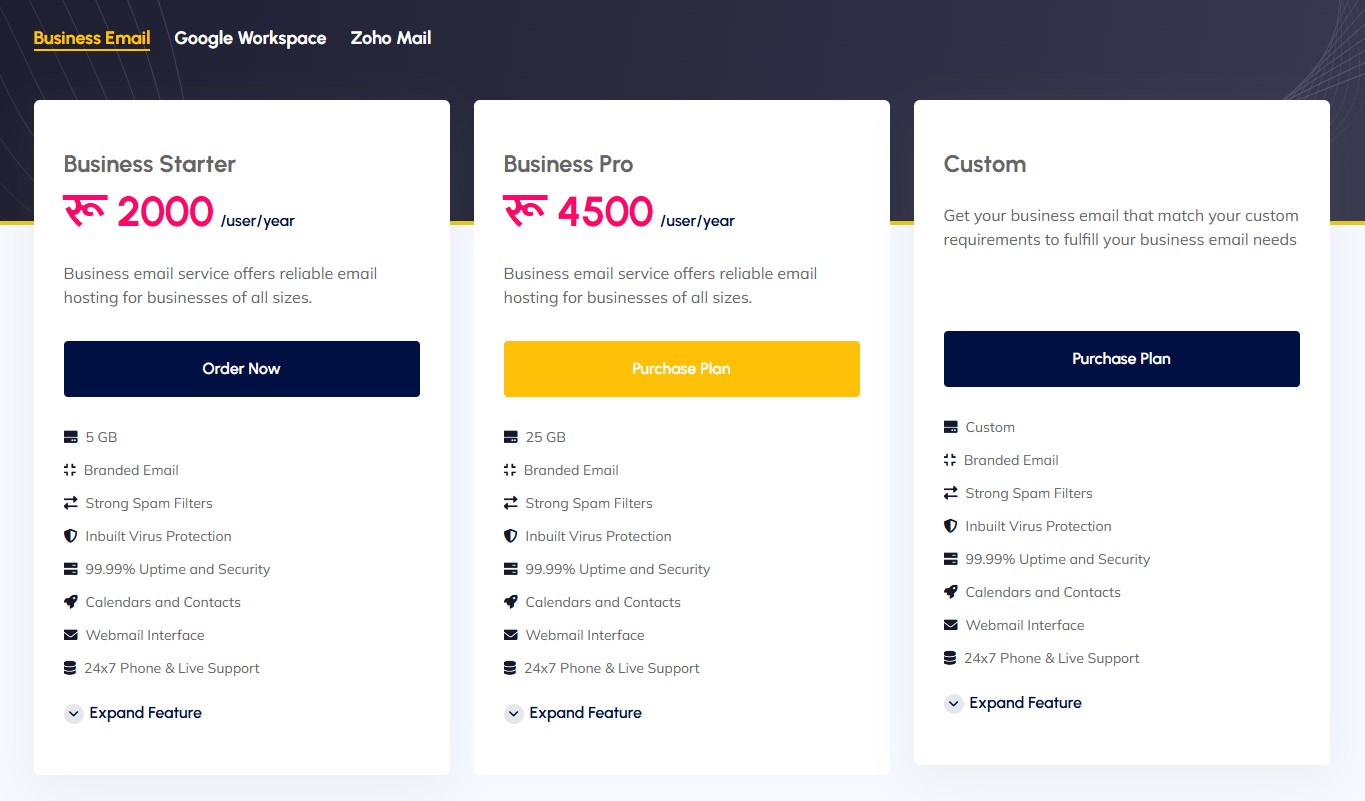
- Google Workspace from Yoho.Cloud – Google workspace is one of the most popular email hosting platform that seamlessly integrates with all other Google service via Google Workspace. It is a great pick for collaboration, storage, and security. Get Google Workspace business email from Yoho.Cloud
- Zoho Mail from Yoho.Cloud – Zoho Mail offers the cheapest email hosting services starting as low as $1/month. While it lacks seamless integration with popular services, it still gets along with a tons of productivity applications. Get your Zoho Mail via Yoho.Cloud today!
- Yoho.Cloud Business Email Hosting – A reliable, Nepal-based solution with custom support, email migration, and daily backups included. Yoho Cloud’s cheapest plan starts at just $1.1/month.
3. Create User Accounts for Your Team
After choosing your provider, you’ll create individual email accounts for yourself and your team members. Typical business hosting might include: [email protected] , [email protected], and [email protected]. Creating role-based email addresses makes communication more organized and easier for customers to navigate.
4. Configure DNS and MX Records
Once your accounts are set up with your desired provider, you’ll get specific DNS and MX (Mail Exchange) records to add to your domain’s DNS settings. Getting this step right is essential if you want to maximize your chances of landing in recipient’s email. If you registered your domain through Yoho.Cloud, this process is streamlined with our support team can often set it up for you or guide you through it quickly.Once you’re live, test your professional business email address to ensure it’s sending and receiving properly. Don’t forget to update your contact info on your website, invoices, social media, and business cards.
Tips for Choosing the Right Email Name
- Use real names or department-based emails:
Examples:
- Avoid symbols, numbers, or unnecessary complexity:
Emails like [email protected] or [email protected] can look unprofessional and be harder to remember. - Keep it short, readable, and consistent:
Stick to lowercase letters and limit punctuation. Consistency across your team helps maintain brand clarity, for example, always use [email protected] or [email protected] throughout the organization. - Avoid personal nicknames or slang:
This keeps your communication formal and avoids confusion when customers or partners try to reach you.
Email Etiquette for Business Communication
- Write clear, specific subject lines: Avoid vague titles like “Question” or “Hi.” Instead, say something like “Request for Quotation: Web Hosting Package” or “Follow-up on July 31 Meeting.”
- Proofread before sending: Spelling errors, typos, and poor grammar can damage your credibility. Take a few seconds to review your message before hitting send.
- Maintain a polite and professional tone: Avoid overly casual language or emojis unless you know the recipient well. Even if you’re friendly, keep it business-appropriate.
- Respond promptly: Aim to reply within 24 hours, even if it’s just to acknowledge the email and let them know you’ll follow up. It shows respect and builds trust.
- Use a professional business email signature: Include your name, job title, company name, and contact details. This adds legitimacy and makes it easier for recipients to get in touch.
Security Tips to Protect Your Email
Once you’ve set up professional business email address, it’s crucial to secure it properly. Business emails often contain sensitive information like client data, invoices, login credentials, and confidential conversations. If compromised, the consequences can be costly, both financially and reputationally. Here are essential email security tips to help you protect your business communication:
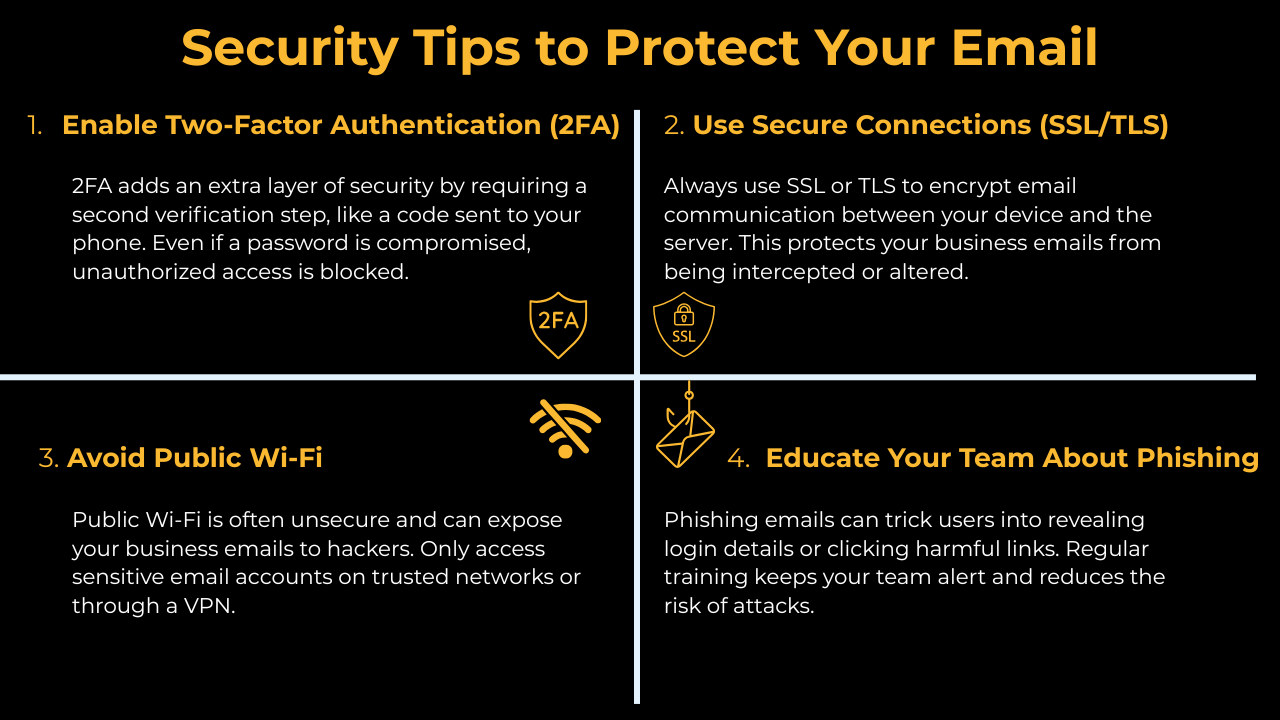
Enable Two-Factor Authentication (2FA)
Two-factor authentication adds a vital layer of protection by requiring a second form of verification, usually a code sent to your phone, when logging into your email account. This security mechanism has been mandatory for popular sites like Facebook, Instagram, and more. With two-factor authentication, even if someone gets your password, they won’t be able to access your business email without the second code.
Use Secure Connections (SSL/TLS)
Always make sure your email is transmitted over encrypted connections. SSL (Secure Sockets Layer) or TLS (Transport Layer Security) ensures that messages between your device and the mail server are protected from eavesdropping or tampering. Check that your provider supports SSL encryption for both incoming and outgoing mail, and make sure it’s activated in your email client settings.
Avoid Public Wi-Fi When Sending Sensitive Emails
While public Wi-Fi networks are convenient, they are very insecure and can put your emails at risk. Hackers can easily intercept data on open networks. If you must use public Wi-Fi, avoid sending sending information or logging into your business email account unless you’re connected through a VPN (Virtual Private Network). As a rule: only access your business email account from secure, trusted networks.
Educate Your Team About Phishing
Phishing attacks are one of the most common ways hackers gain access to business emails. These attacks often come in the form of fake login pages or emails that trick users into clicking malicious links. Even the most secure email system is vulnerable if the people using it aren’t alert and informed.
Train your staff to:
- Never click on suspicious links
- Double-check sender email addresses
- Be cautious with unexpected attachments
- Report suspicious emails immediately
How to Choose the Right Email Hosting Provider
Choosing the best email hosting provider is crucial decision and your entire business communication relies on it. Whether you’re a startup or an established company, choosing the right provider will offer reliability, strong security, and smooth onboarding. Here’s how you can choose the best business email hosting solution.
Server Uptime & Reliability
One of the most essential things to look for in a hosting provider is server uptime, the percentage of time the service is operational. A high uptime (ideally 99.9% or more) ensures that your business email services are always accessible. Aim for service providers like Yoho Cloud that offers 99.9% uptime guarantee. Downtime can lead to missed opportunities and communication delays. We offer robust infrastructure with high uptime guarantees, so your emails keep flowing without interruption.
Security Features
Security is non-negotiable. A professional business email hosting provider should protect your inbox from spam, malware, and data breaches. Look for:
- SSL/TLS encryption
- Two-Factor Authentication (2FA)
- Anti-phishing filters
- Spam and virus protection
With Yoho.Cloud, security comes standard including encrypted email transmission, secure Webmail access, and strong privacy protection.
Support & Migration Assistance
Email can be complex to set up, especially when switching providers. That’s why responsive support and hassle-free migration options matter. Look for providers that offer:
- 24/7 technical support
- Easy account setup
- Email migration tools
Yoho.Cloud makes transitioning smooth with expert support and guided email migration, even if you’re coming from another platform like Gmail or cPanel.
Scalability and Extras
As your business grows, your email hosting solution should scale with you. Choose a provider that offers flexible plans, storage upgrades, and collaboration tools. Integration with calendars, contacts, and mobile access are also valuable. Whether you’re a solo entrepreneur or managing a large team, Yoho.Cloud provides scalable business email hosting, with bonus features like free SSL, Webmail access, and affordable pricing.
Common Mistakes to Avoid with Business Email
Even with the best tools and intentions, small missteps can make your business email look unprofessional or even compromise security. Avoiding these common mistakes will help you maintain trust, consistency, and credibility in your email communication.
Using Free/Public Domains (like Gmail or Yahoo)
One of the biggest red flags in professional communication is sending emails from a free domain email address, such as [email protected]. It immediately gives the impression of an unestablished or informal operation.
Always use a custom domain (e.g.,
[email protected]) for your business email account, it enhances your brand image and builds customer trust.
Inconsistent Naming Formats
Inconsistency in how email addresses are structured, like mixing [email protected], [email protected], and [email protected], creates confusion and weakens your brand identity.
Stick to a clear, unified format for all your professional business email addresses (e.g.,
[email protected]or[email protected]).
Weak Passwords
Your business email account contains sensitive information, from client communications to financial data. Using weak, predictable passwords (or reusing the same one across accounts) leaves you vulnerable to hacking and phishing.
Use strong, unique passwords and enable two-factor authentication (2FA) for all business email users.
Poor Grammar, Spelling, or Tone
Grammatical mistakes, spelling errors, or overly casual language in business emails can damage your professionalism. It may lead clients to question your attention to detail or even your legitimacy.
Always proofread your messages. Use tools like Grammarly or Hemingway for quick checks, and maintain a polite, professional tone in all communications.
Conclusion: Upgrade Your Business Presence with a Branded Email
In today’s digital world, a professional business email address is more than just a communication tools and a sign of luxury, it’s a signal of credibility, trust, and brand consistency. Whether you’re engaging new clients, following up with leads, or collaboration within the company, a branded email tied to your domain shows that your mean business. From improving email deliverability and security, to reinforcing your brand identity in every inbox, the benefits of a professional business email address are clear. And with user-friendly solutions from platforms like Yoho.Cloud, Google Workspace, and Zoho mail all from a single platform, getting started has never been easier.
And with user-friendly solutions from platforms like Yoho.Cloud, Google Workspace, and Zoho, getting started has never been easier. Don’t settle for a generic email address. Take the next step in professionalizing your communication and building long-term trust with your audience. Get your branded business email today, and start making the right impression with every message you send.

Cpanel vs Plesk: Which hosting panel is best ?
Editorial StaffHow does a website Increase your Brand Value?
Editorial Staff